

Tutorial: an agent that acts
In this tutorial an agent handles refund requests. It looks the order up with a read tool and, when the order arrived damaged, proposes a refund — a write that moves money, so a person in finance approves the exact call first. Then the payments service crashes in the middle of the refund, and you see the engine refuse to pay twice.
| You will see | Where |
|---|---|
| A tool server with read and approval-required tools | Step 3 |
| Tools, limits and a budget on the agent | Steps 5–6 |
| Every model and tool call, live, with its cost | Step 7 |
| A person approving the exact refund | Step 9 |
| A crash mid-write that is never repeated | Steps 10–11 |
| The cost and who can read the payloads | Steps 12–13 |
It takes about 20 minutes. The Concepts page explains each capability in a few lines.
Before you start
- You have a clone of the repository and the
development platform runs from it; you can sign in to
Studio at
http://studio.localhostas alice (alice/alice) and bob (bob/bob). - An AI provider is set in Studio → Settings → AI Providers.
- You followed Tutorial: a reviewed AI reply or know how to create a project and paste APL.
1. Start the payments stub
Section titled “1. Start the payments stub”The demo kit runs a small payments MCP server next to the agent worker, with
two tools: get_order reads an order, refund records a refund. Start the
platform with its overlay:
docker compose --env-file .env.dev -f compose.yaml -f compose.dev.yaml \ -f scripts/dev/m3-demo/compose.demo.yaml --profile agent up -dThe overlay also lets the worker reach the payments tool server
(ABADA_AGENT_ALLOWED_TOOLS=payments): a worker only calls tool servers its
operator allows, whatever a process declares.
2. Create the project and let bob approve
Section titled “2. Create the project and let bob approve”As alice, create a project named Refunds. Then, as in
the first tutorial, add bob as a
Viewer with the task group finance (Admin → Projects → Add Member).
Refund approvals will be offered to finance.
3. Add the payments tool server
Section titled “3. Add the payments tool server”Tools are declared once per project, on a tool server. In the Project
panel, hover resources, click New file, choose the kind
TOOL_SERVER (MCP), name it payments.yaml and select this file
(examples/apl/tool-servers/payments.yaml):
name: paymentsdescription: Orders and refundstransport: streamable-httpurl: http://127.0.0.1:8765/mcptools: get_order: { policy: read } refund: { policy: approval_required, idempotency: none, approvers: [finance], approval_sla_hours: 4 }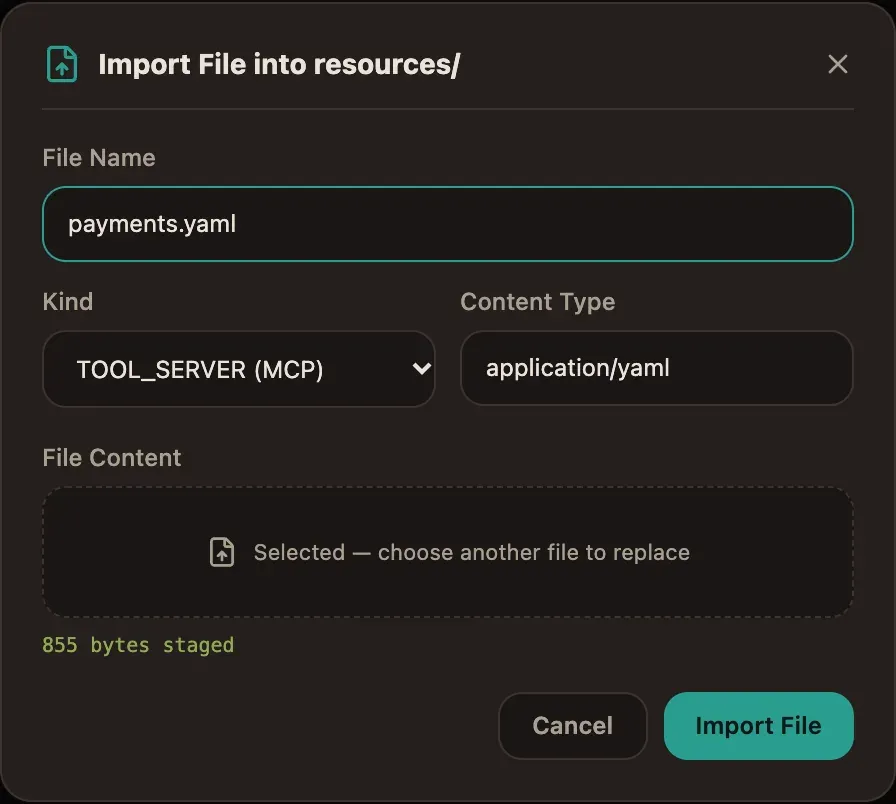
The engine validates the document on every save:
get_orderis a read: no side effects, the agent calls it freely.refundis approval_required: someone infinanceapproves each call, with its exact arguments, before it runs. A late approval (four hours) is marked escalated.idempotency: nonesays the payments service cannot deduplicate a refund. You will see in step 10 why that matters.
The URL is the stub on the worker’s loopback; a real server must use https.
A project tool credential would carry its token — the document only names
it, never the secret.
4. Paste the process
Section titled “4. Paste the process”Click + next to Project, choose Paste APL, paste
examples/apl/refund-agent.apl.yaml
and name it refund_agent. The agent step is the heart of it:
- id: handle type: agent description: Check the order and refund the customer model: gemini-3.6-flash prompt: | A customer asks for a refund. Look up the order with the get_order tool. Refund the amount paid with the refund tool only when the order was delivered damaged or never delivered; otherwise refund nothing. Answer with whether you refunded, the amount and a one-sentence reason. inputs: request: ${request} tools: - payments/get_order - payments/refund max_turns: 6 budget_usd: 0.05 result_variable: decision output_schema: type: object required: [refunded, reason] properties: refunded: { type: boolean } amount: { type: number } reason: { type: string } on_invalid_output: manual on_error: manual on_timeout: { after: P2D, then: manual } next: done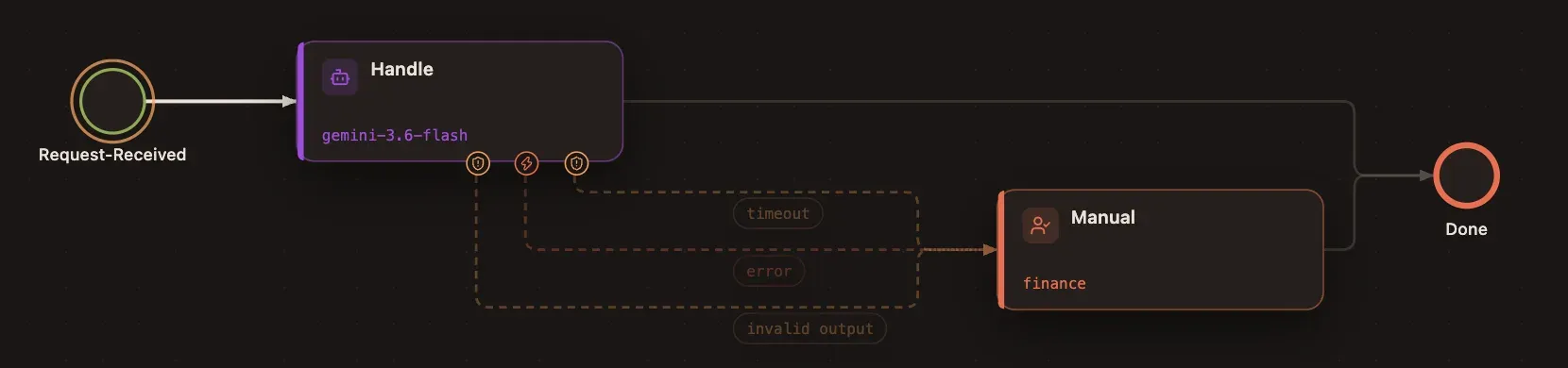
Whatever goes wrong — an invalid answer, a failure, two days without an answer — the request reaches a person in finance instead of getting lost.
5. Read the agent’s tools and limits
Section titled “5. Read the agent’s tools and limits”Click the Handle step. In the inspector, the tools come from the project’s tool servers, each with the policy its server declares:
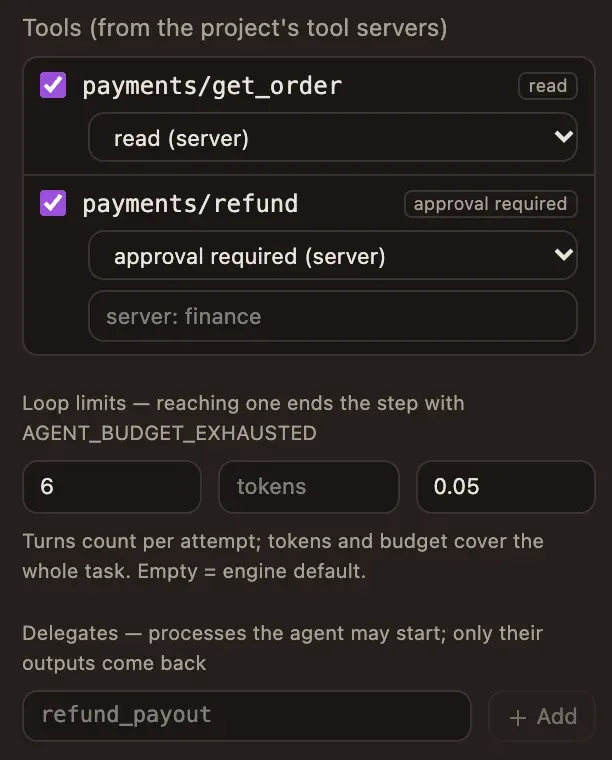
- A step can only tighten a policy — make a write approval-required, or name its own approvers — never loosen it. Deployment refuses a looser one.
- Loop limits bound the conversation: six model calls per attempt, and a
budget of five cents for the whole task. Reaching a limit ends the step with
AGENT_BUDGET_EXHAUSTED, whichon_errorroutes to finance here.
6. Give the model a price
Section titled “6. Give the model a price”The budget is computed by the engine from token counts and the prices you set,
never reported by a worker. Open Settings → Model Prices and add a price
for gemini-3.6-flash (here 0.30 and 2.50 dollars per million input and
output tokens):
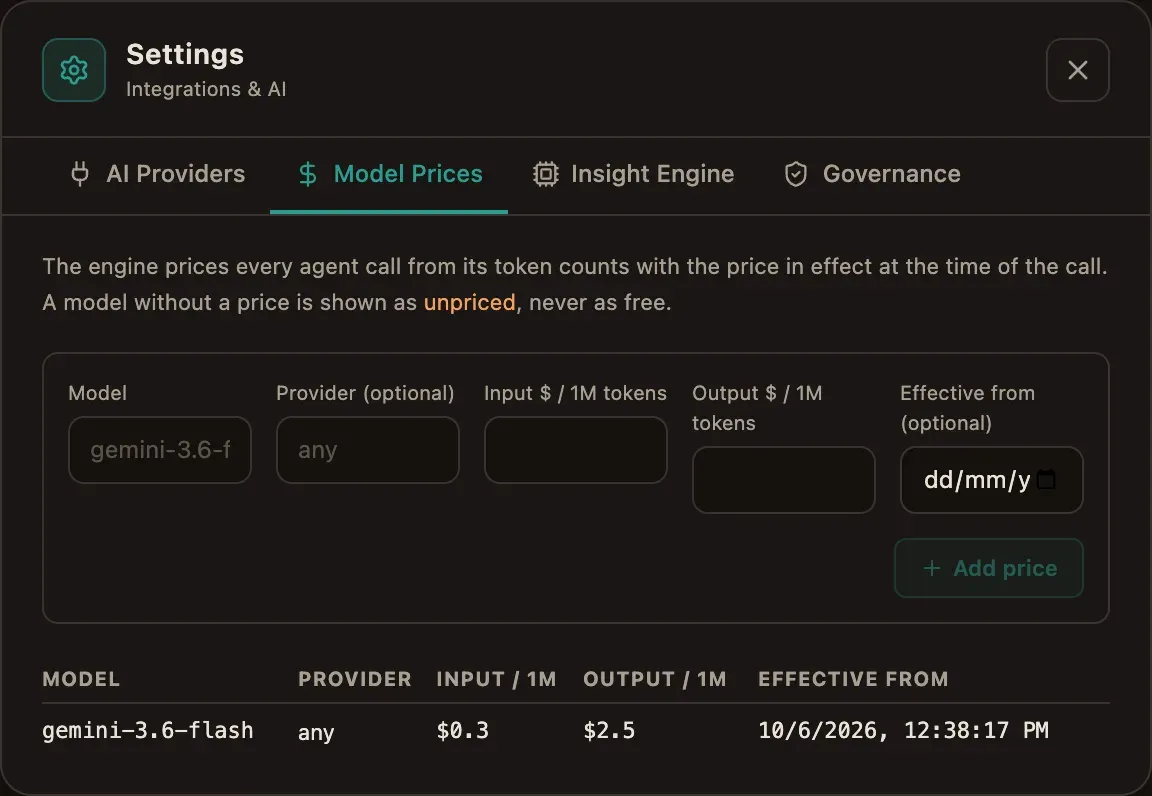
Without a price, a step with budget_usd fails closed: an unpriced call is
never counted as free.
7. Deploy and start
Section titled “7. Deploy and start”Click Deploy & Start with this payload:
{ "request": { "order_id": "A-1042", "message": "My kettle arrived broken, I want my money back." }}Open the instance from Operations. The header shows Live: the page follows the project’s event stream and refreshes by itself.
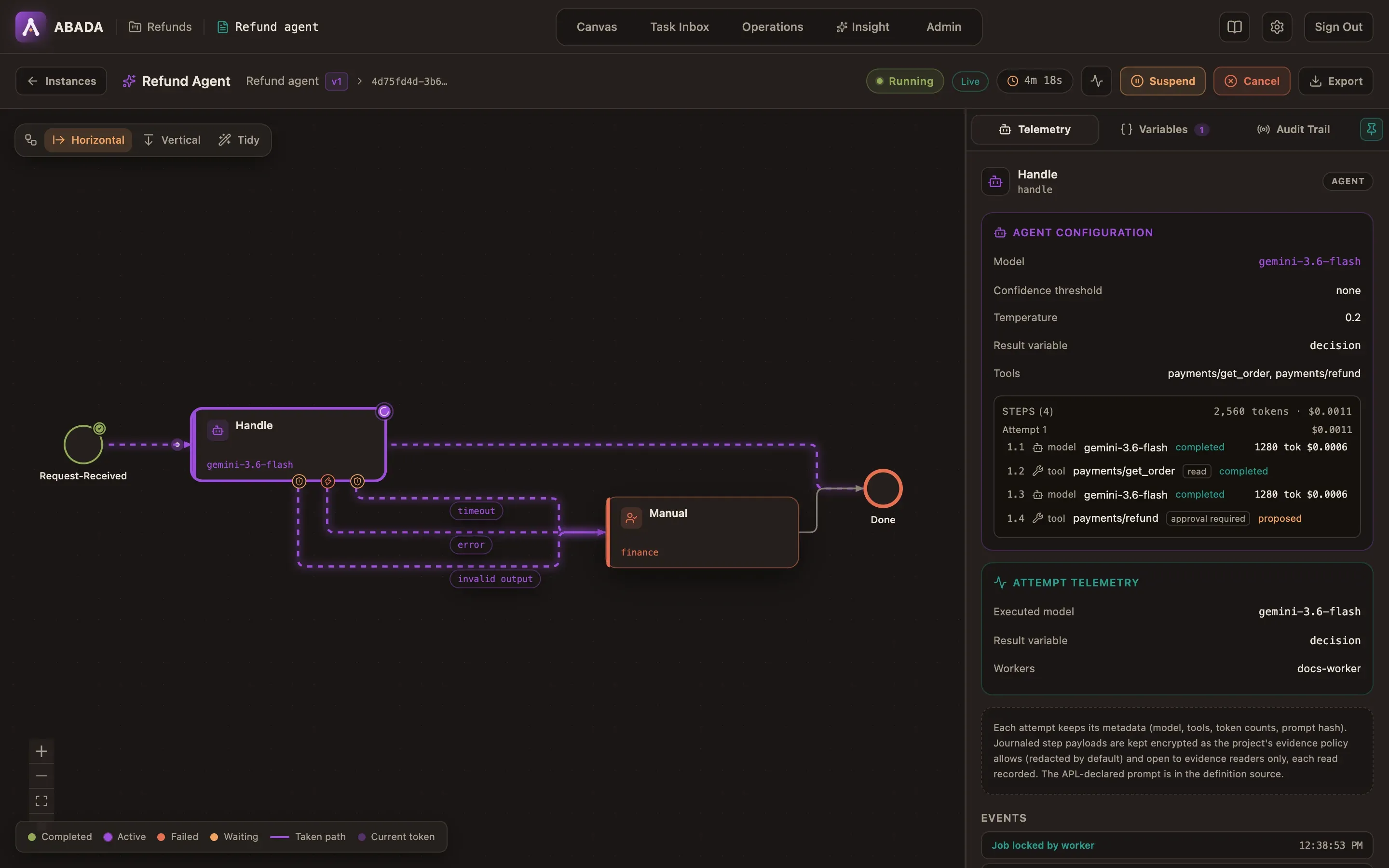
The agent’s steps, in order, with their cost:
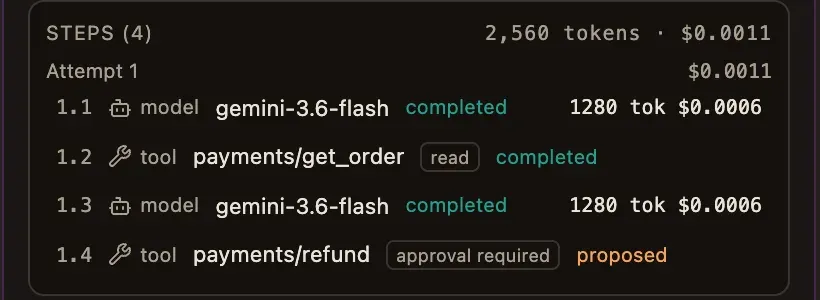
The agent read the order, saw the kettle arrived broken and proposed a refund of the amount paid. Nothing has been paid: the work is parked — no worker holds it, nothing is spent — until a person decides.
8. Make the payments server crash
Section titled “8. Make the payments server crash”Before bob approves, arm the stub’s crash: the next refund will take effect, then the server fails before answering, as a server crashing mid-write would.
docker compose --env-file .env.dev -f compose.yaml -f compose.dev.yaml \ -f scripts/dev/m3-demo/compose.demo.yaml --profile agent \ exec payments-mcp touch /tmp/payments-crash-next-refund9. Bob approves the refund
Section titled “9. Bob approves the refund”Sign in as bob and open the Task Inbox: the approval is offered to
finance. It shows the exact call the agent proposed:
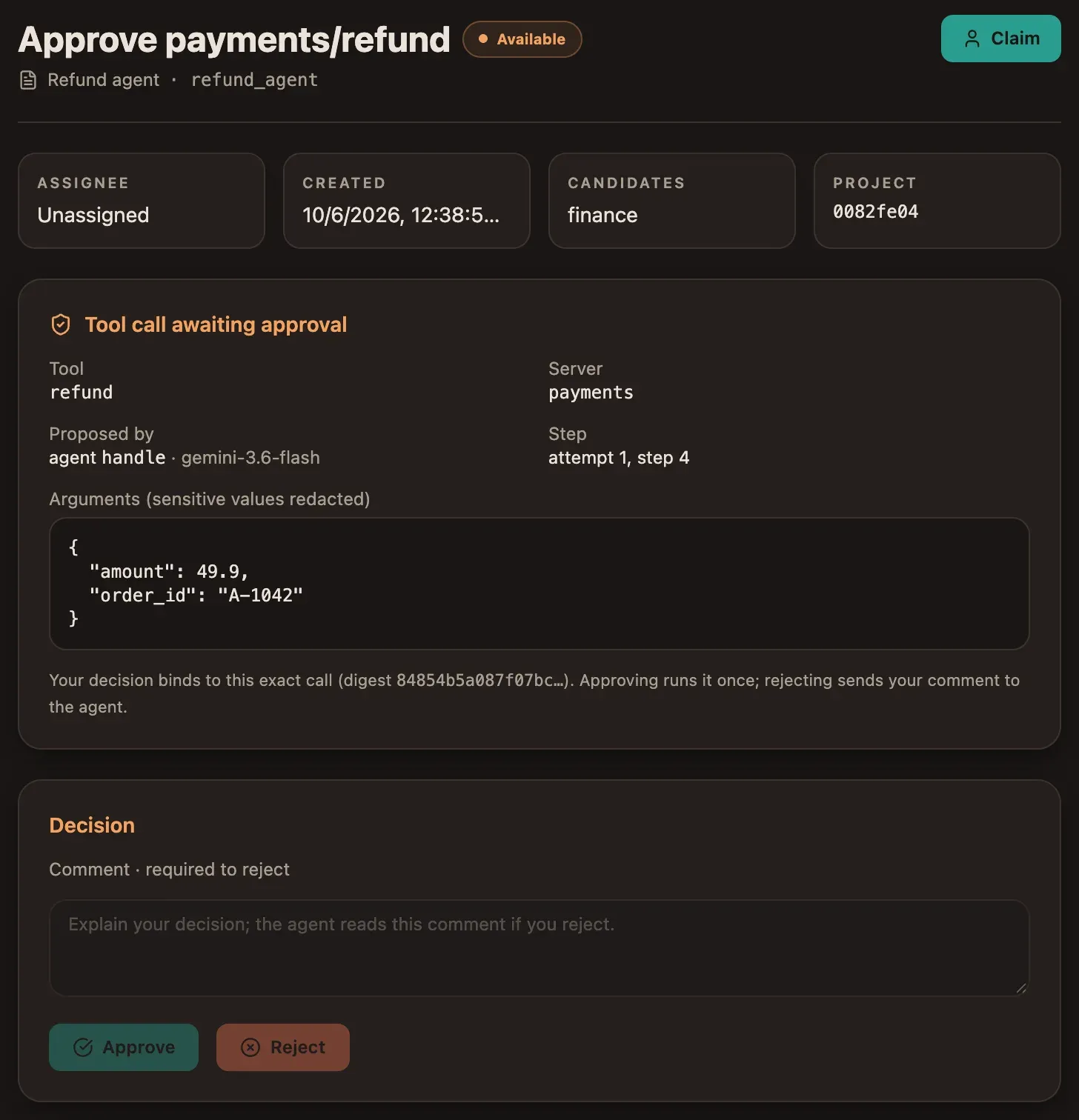
Claim it and click Approve. The decision binds to this exact call: the
worker may run refund once, with these arguments and no others. A rejection
would need a comment, which the agent reads before it continues.
Only a person in the approver groups can decide. A worker credential never can, and a project role is not enough.
10. The write’s outcome is unknown
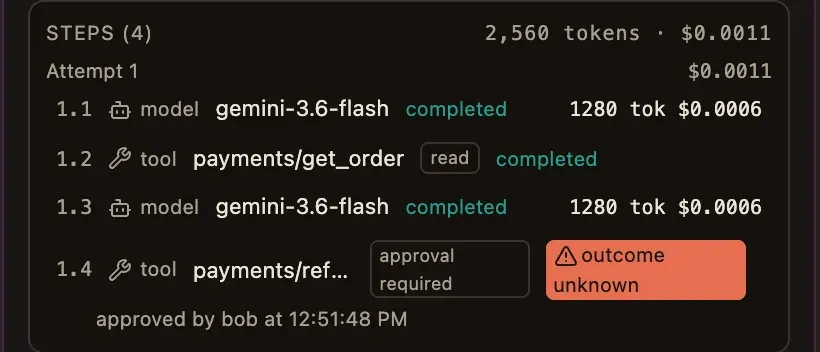
Section titled “10. The write’s outcome is unknown”The worker runs the approved refund. The payments service applies it — and crashes before answering. A few seconds later, as alice, open Operations:

The refund was journaled before it ran, so the engine knows it started and
never finished. The payments service takes no idempotency key, so sending it
again could pay the customer twice: the engine never hands that work out again.
The step is OUTCOME_UNKNOWN, the approval is kept with it, and the process
waits for a person.
11. Check, then confirm
Section titled “11. Check, then confirm”Check what really happened in the payments system. Here, the stub lists its refunds:
docker compose --env-file .env.dev -f compose.yaml -f compose.dev.yaml \ -f scripts/dev/m3-demo/compose.demo.yaml --profile agent \ exec payments-mcp wget -qO- http://127.0.0.1:8765/refunds[{"refund_id": "R-0001", "order_id": "A-1042", "amount": 49.9, "at": "…"}]The refund happened, so click It happened. The agent resumes the same attempt from its journal and reads that the refund was performed: it does not call the tool again, it answers.
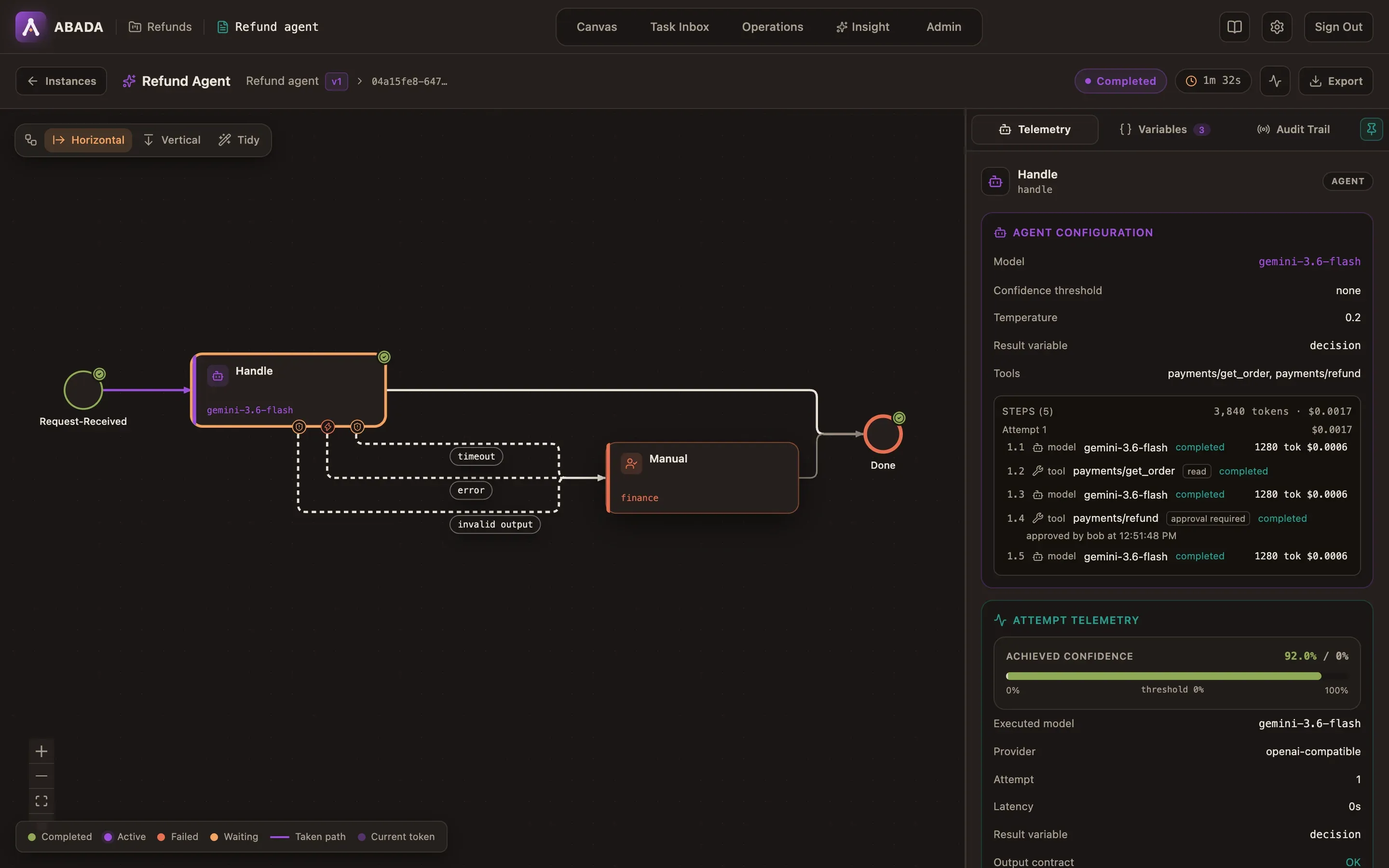
Had you clicked It did not happen, the agent would have read that, and could propose the refund again — through a new approval.
12. Read what it cost
Section titled “12. Read what it cost”The step inspector shows the whole conversation and what it cost:
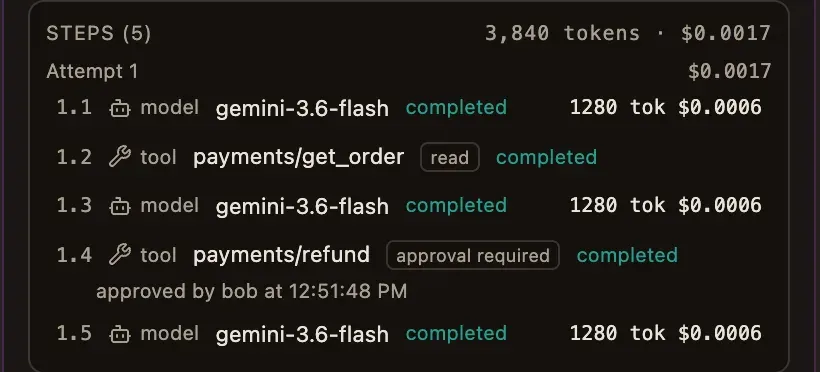
- Bob’s approval stays on the refund step; who confirmed the crash outcome is recorded with the incident in the Audit Trail.
- Each model call is priced with the price in effect when it ran; the inspector totals the task (here 0.0017 dollars for 3,840 tokens).
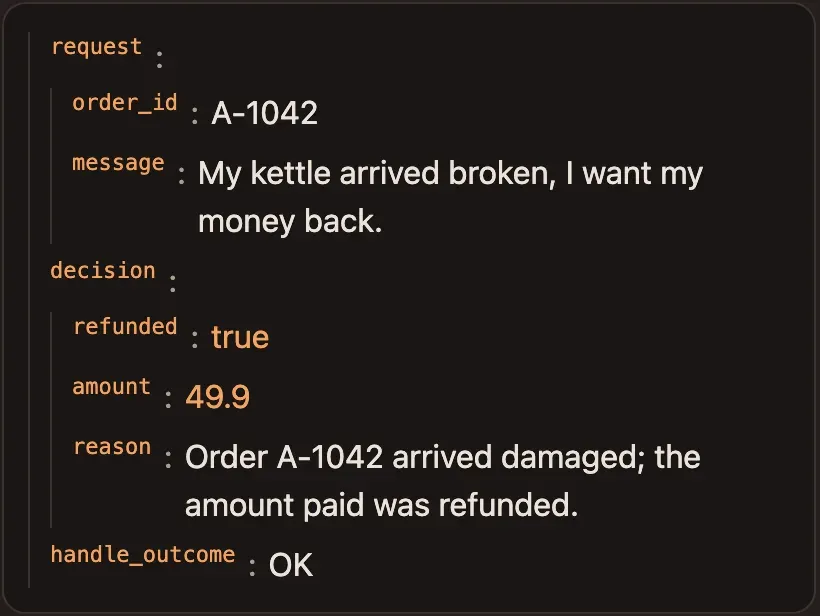
The agent’s answer passed the output contract and is in Variables:
13. Payloads need a role
Section titled “13. Payloads need a role”Click a step to read its payloads — the prompt, the model’s reply, the tool’s arguments and result:
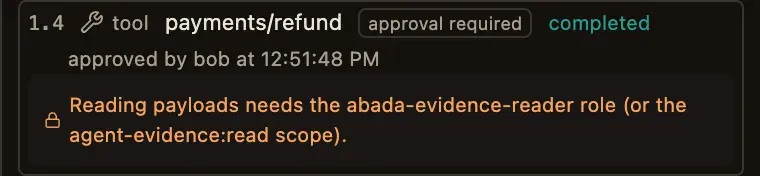
Alice administers the platform, but administration does not imply reading
evidence. Payloads are kept as the project’s evidence policy allows (redacted
by default, 30 days), encrypted, and readable only by members with the
abada-evidence-reader role; every read is recorded.
What you built
Section titled “What you built”- An agent that acts through a governed tool server: it reads freely, and every refund waits for a person in finance.
- A write that survived a crash without being repeated, with a person confirming what happened.
- Bounded turns and spend, priced by the engine, with every step, its cost and its approver on the instance page.