

Loops, routes and review decisions
Real processes go back, wait, fail and ask people to decide. This page shows each of these shapes in APL, what the engine guarantees, and how to edit it in Studio. The tutorial uses all of them in one process.
| You want to… | Use |
|---|---|
| Redo a step after a rejection, but not forever | loop |
| Let a reviewer choose what happens next, with a reason | outcomes |
| Send weak or malformed AI answers to a person | on_low_confidence, on_invalid_output |
| Handle a failed step | on_error |
| Stop a step that takes too long | on_timeout |
| Escalate a human task that is late, without cancelling it | sla_hours, escalate_to |
| Survive a rate-limited or unavailable model | fallback_models |
| Let an agent read a scanned document, a photo or a PDF | files |
Repeat a step with a limit
Section titled “Repeat a step with a limit”A process may go back to an earlier step as long as that step says how many times it may run:
- id: draft type: agent loop: { max_iterations: 3, on_exhausted: triage } next: review- The engine counts the passes in
draft_iteration(1, 2, 3…), which a prompt or a condition can read. - After the third pass, the next arrival continues at
on_exhausted. Withouton_exhausted, the instance stops atdraftwith aLOOP_EXHAUSTEDincident that an operator resolves (see Operate running processes). - A cycle whose target declares no
loopis refused at deployment. A cycle cannot return to the start node, a parallel or an inclusive gateway. - Each parallel branch counts its own passes.
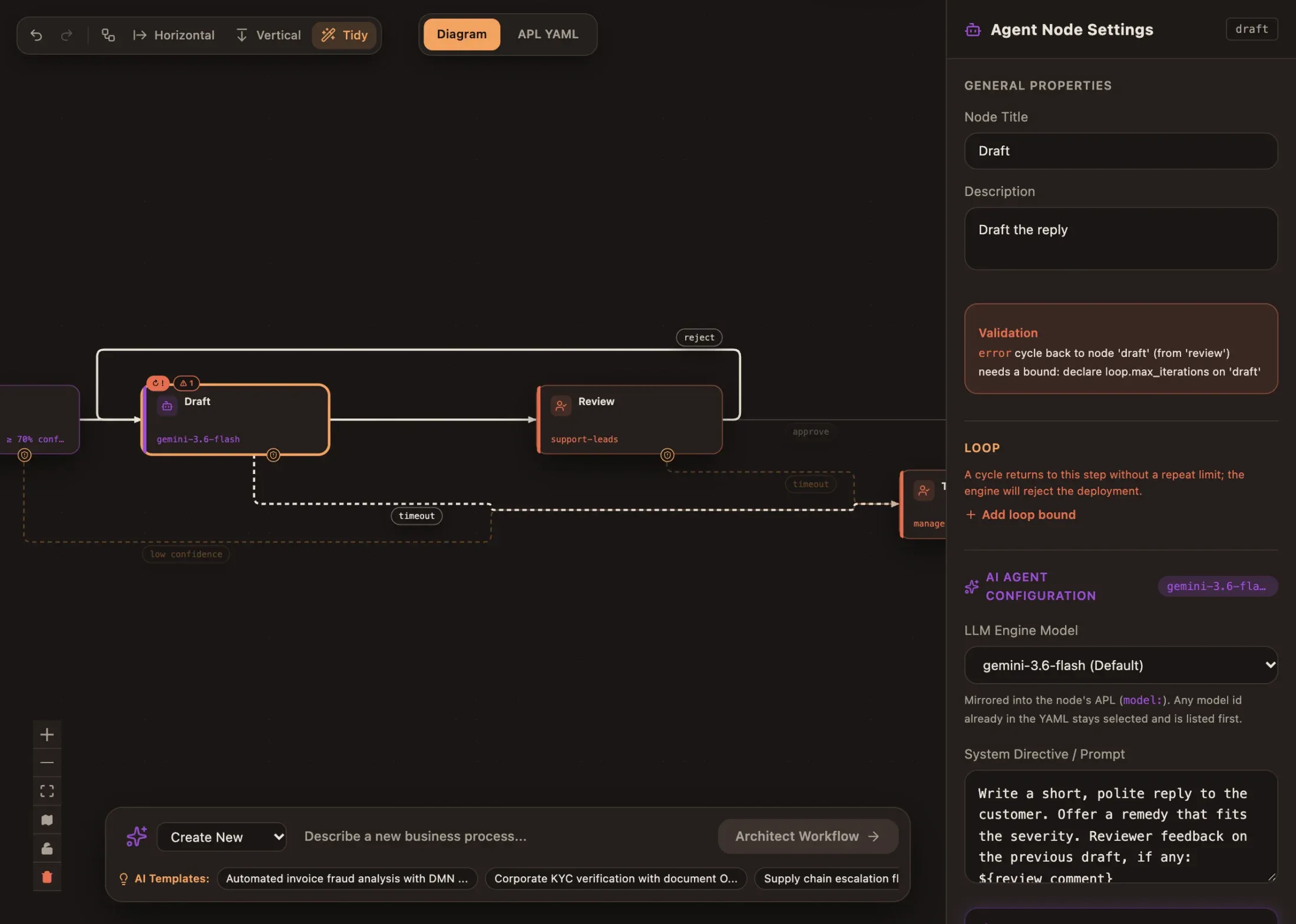
In Studio, a loop step shows ↻ 3. A cycle without a usable limit turns the
step red (↻ !) with the engine’s message and an Add loop bound button in
the inspector:
Review decisions
Section titled “Review decisions”A human step can ask for a decision instead of a plain “done”. Each outcome says where the process goes and whether the reviewer must explain it:
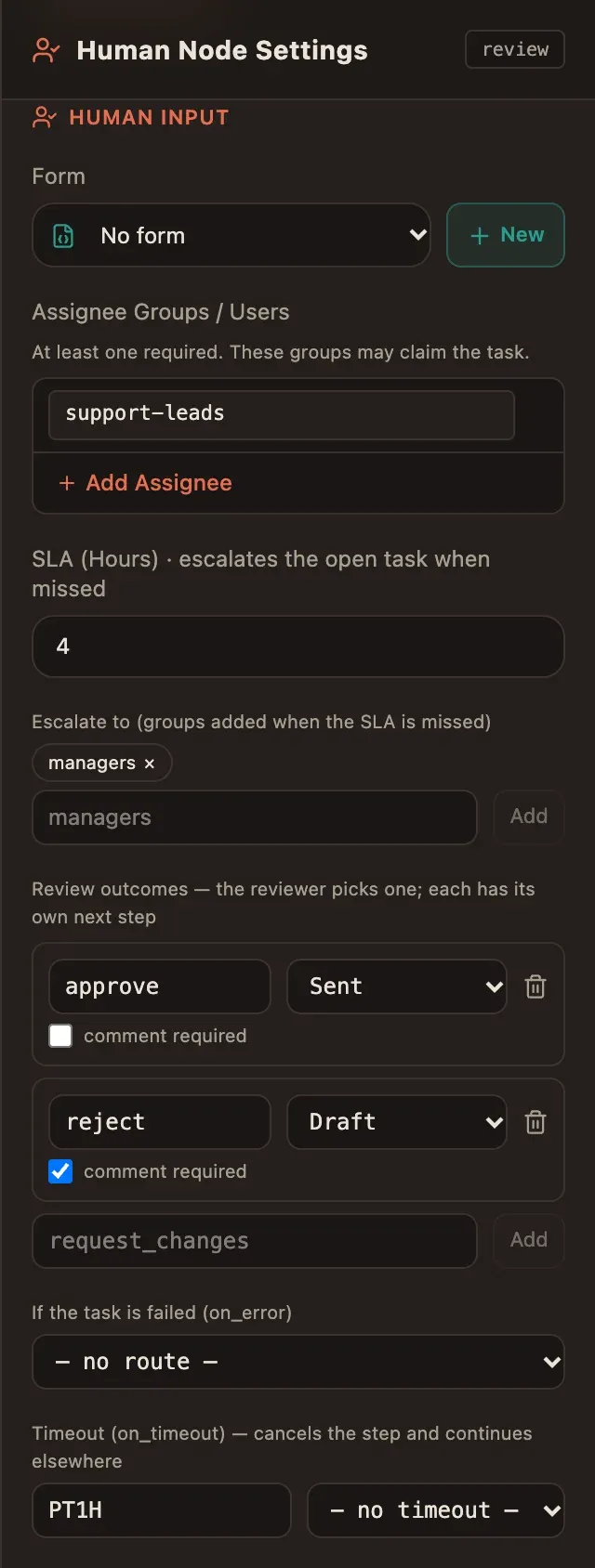
- id: review type: human-input assignees: [support-leads] outcomes: approve: { next: sent } reject: { next: draft, comment: required }- Two to six outcomes, named in lowercase (
approve,request_changes; up to 32 characters). A step with outcomes has nonext. - The reviewer sees one button per outcome and a comment box in the Task Inbox. The engine refuses an unknown outcome or a missing required comment — the UI is a convenience, not the guard.
- The decision is stored in
review_outcomeand the comment inreview_comment, so the next step can use them. Here the agent reads${review_comment}and rewrites its draft. - History records the outcome and the comment length, never the comment text.
- Clients decide with
POST /api/v1/projects/{projectId}/tasks/{taskId}/decisionand a body{"outcome": "reject", "comment": "…"}; a plain complete is refused on a step that declares outcomes.
In BPMN, the same decision is a user task with abada:outcomes (see BPMN
import and compatibility).
Let the agent choose the next step
Section titled “Let the agent choose the next step”An agent can pick where the process goes next, among routes you declare:
- id: triage type: agent model: gemini-3.6-flash prompt: "Route this request: ${request_text}" routes: refund: { next: refund, description: The customer asks for money back, when: "amount <= 500.0" } escalate: { next: manual, description: Anything unclear, angry or legal } on_invalid_output: manual- The agent answers with a
route(the engine adds it to the output contract and tells the model the descriptions). The engine only accepts a declared route; anything else is an invalid output. - A route’s
whenis the engine’s veto: here a refund over 500 is never taken, whatever the agent says, and the result goes toon_invalid_output. - The route taken is stored in
triage_routeand recorded in the history with the agent’s confidence. A step with routes has nonext; a route back to an earlier step needs a loop limit. - In Studio, open the agent’s Routes box and choose Let the agent choose the next step; each route draws its own edge on the canvas.
Let an agent delegate to another process
Section titled “Let an agent delegate to another process”An agent can start another process of the project and continue with its result, when its step declares it:
- id: triage type: agent model: gemini-3.6-flash prompt: "Handle the refund request for ${order}" delegates: - process: refund_payout description: Pay a refund out to the customer outputs: [payout_id] next: done- The agent sees a
delegate__refund_payouttool whose inputs are the variablesrefund_payoutdeclares. The engine checks them, then starts the payout as its own process; the instance page shows it under Called processes, delegated by the agent. - While the payout runs, the agent waits without holding a worker. When it
ends, the agent reads
payout_id(and nothing else of the payout) and continues; if the payout fails or is cancelled, the agent is told and decides what to do. - Add
approval: requiredandapprovers: [finance]to have a person approve each delegation, with its inputs, before the child starts. - Deploy
refund_payoutfirst: the version is fixed when this process is deployed, as for a call-process step.
Approving an agent’s tool call
Section titled “Approving an agent’s tool call”Some tool calls should not run until a person agrees. Mark the tool
approval_required on its tool server, and say who approves it there or on the
node:
- id: triage type: agent model: gemini-3.6-flash prompt: Decide whether to refund ${order} tools: - payments/lookup - { ref: payments/refund, approvers: [finance] } next: done- When the agent wants to call
payments/refund, it stops. A Tool call awaiting approval task appears in the Task Inbox for thefinancegroup, showing the tool, the agent and the arguments (sensitive values redacted under the project’s evidence policy). - Approve runs exactly that call, once, and the agent carries on. Reject needs a comment: the agent reads it as the tool’s answer and continues without the call.
- Only members of the approver groups can decide; the step’s project role is not enough, and a worker credential never is. Changing the arguments after approval is refused by the engine.
- The process does not move while it waits. A timeout on the node or a cancel
withdraws the approval.
approval_sla_hourson the tool marks a late approval as escalated. - Without approvers on the node or the server, the process does not deploy
(
ABADA-APL-TOOL-003).
Weak or malformed AI answers
Section titled “Weak or malformed AI answers”The engine checks every agent result before it touches the process:
- id: classify type: agent output_schema: type: object required: [category, severity] confidence_threshold: 70 on_low_confidence: triage # _confidence missing or below 70 on_invalid_output: triage # result does not match output_schemaWithout these routes, a rejected result counts as a failed attempt and is
retried; the last failure follows on_error or opens an incident.
Errors
Section titled “Errors”on_error is taken when a worker reports an error, or when the last attempt
of a step fails. A list routes specific error codes first:
- id: sync-crm type: engine-task service: crm-sync on_error: - { code: CUSTOMER_UNKNOWN, then: create-customer } - { then: manual-fix } # any other errorWithout on_error, a step that fails for good stops the instance with a
WORK_FAILED incident. Agent, engine-task and human steps all accept
on_error.
Timeouts
Section titled “Timeouts”on_timeout stops a step after an ISO-8601 duration (PT30M, PT2H, P2D;
from one second to 365 days), cancels its work and continues at then:
on_timeout: { after: P2D, then: triage }The clock covers retries and rate-limit waits. Agent, engine-task and human steps accept it.
Service levels
Section titled “Service levels”sla_hours is a promise, not a deadline. When it passes, the task stays
open, the escalate_to groups can claim it too, and a TASK_SLA_BREACHED
event is sent:
- id: review type: human-input assignees: [support-leads] sla_hours: 4 escalate_to: [managers]Combine it with on_timeout when the task must also end at some point.
Fallback models
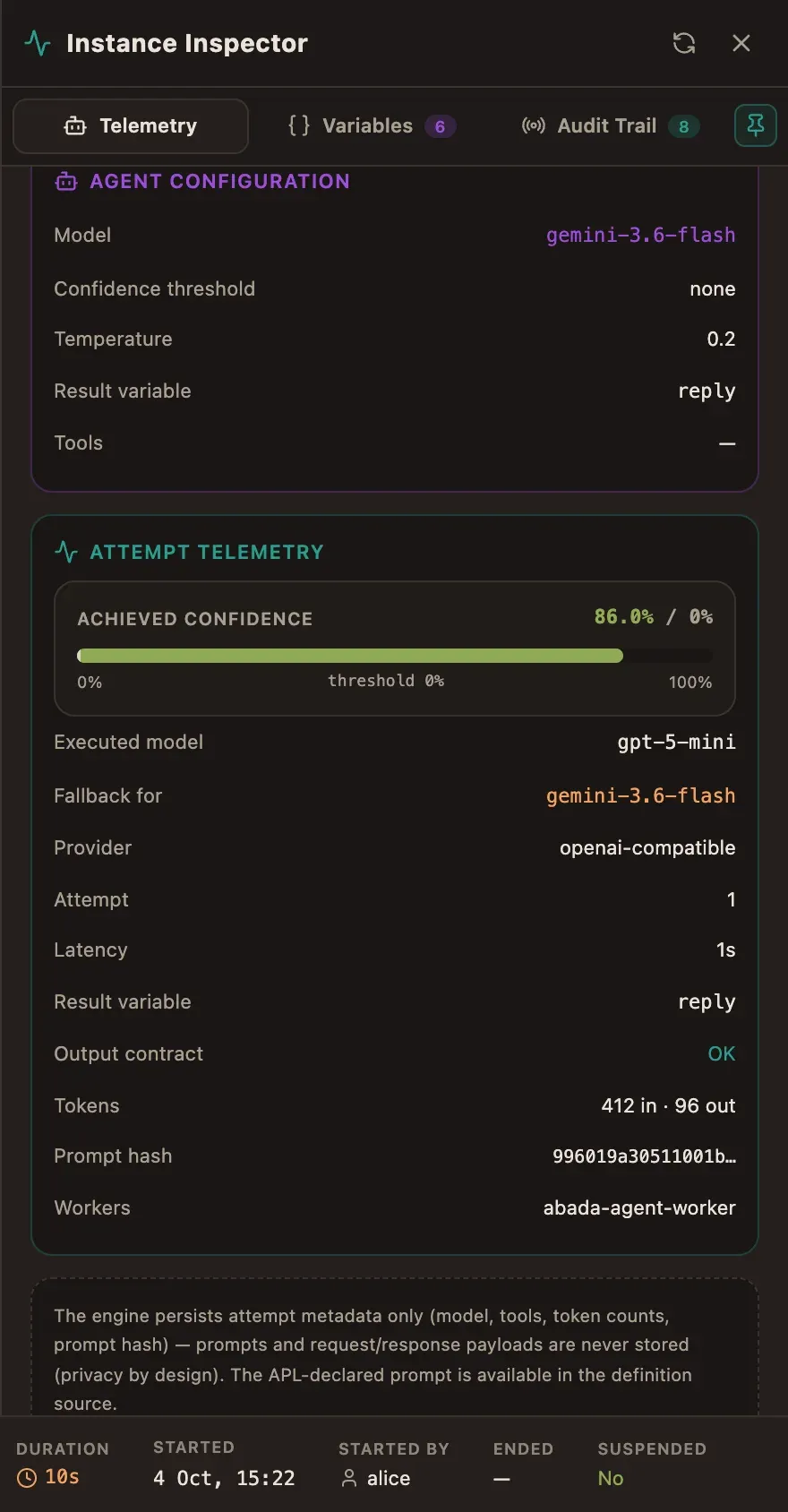
Section titled “Fallback models”- id: draft type: agent model: gemini-3.6-flash fallback_models: [gpt-5-mini]The worker tries the next model only when the one before is unavailable —
rate limit (HTTP 429), quota, timeout, 5xx or unreachable — never because of
its answer. Every model must be on the engine’s allow-list. When none can run,
the attempt waits (the provider’s Retry-After, then a growing delay capped at
15 minutes) and retries without using up max_attempts.
The attempt telemetry shows the model that answered and the one it replaced:
Let an agent read a document
Section titled “Let an agent read a document”A person uploads a scan in a task form; the agent reads the file itself, not a
text copy of it. Declare it in files, next to inputs:
- id: upload type: human-input formKey: invoice-upload # has a file field `invoice_scan` next: read- id: read type: agent model: gemini-3.6-flash prompt: Read the attached invoice and give its totals. files: invoice: invoice_scan # a file reference, or a list of them max_files: 1 # default 5 output_schema: { ... } confidence_threshold: 85 on_low_confidence: enter_by_hand- Only declared files reach the model. When the step starts, the engine
checks each file belongs to this instance and is attached; a reference to
another case’s file, too many files or more than 20 MB fail the step with
AGENT_FILE_INVALIDorAGENT_FILE_LIMIT, whichon_errorcan route. - What a model can read depends on its provider: images and PDF with
Gemini, OpenAI and OpenRouter; images with Anthropic and most self-hosted
vision models. A fallback that cannot read a file is skipped; with none left
the step fails with
AGENT_FILE_UNSUPPORTED. A call is never made without its files. - The contract stays the same: the answer is checked against
output_schemaandconfidence_threshold, and text written inside a document is treated as data, never as instructions. - Evidence. Each model call keeps the file name, type, size and sha256 it read, whatever the evidence policy; the instance’s agent steps show them as file chips you can download (with the usual permissions). The bytes are never logged or kept by the worker.
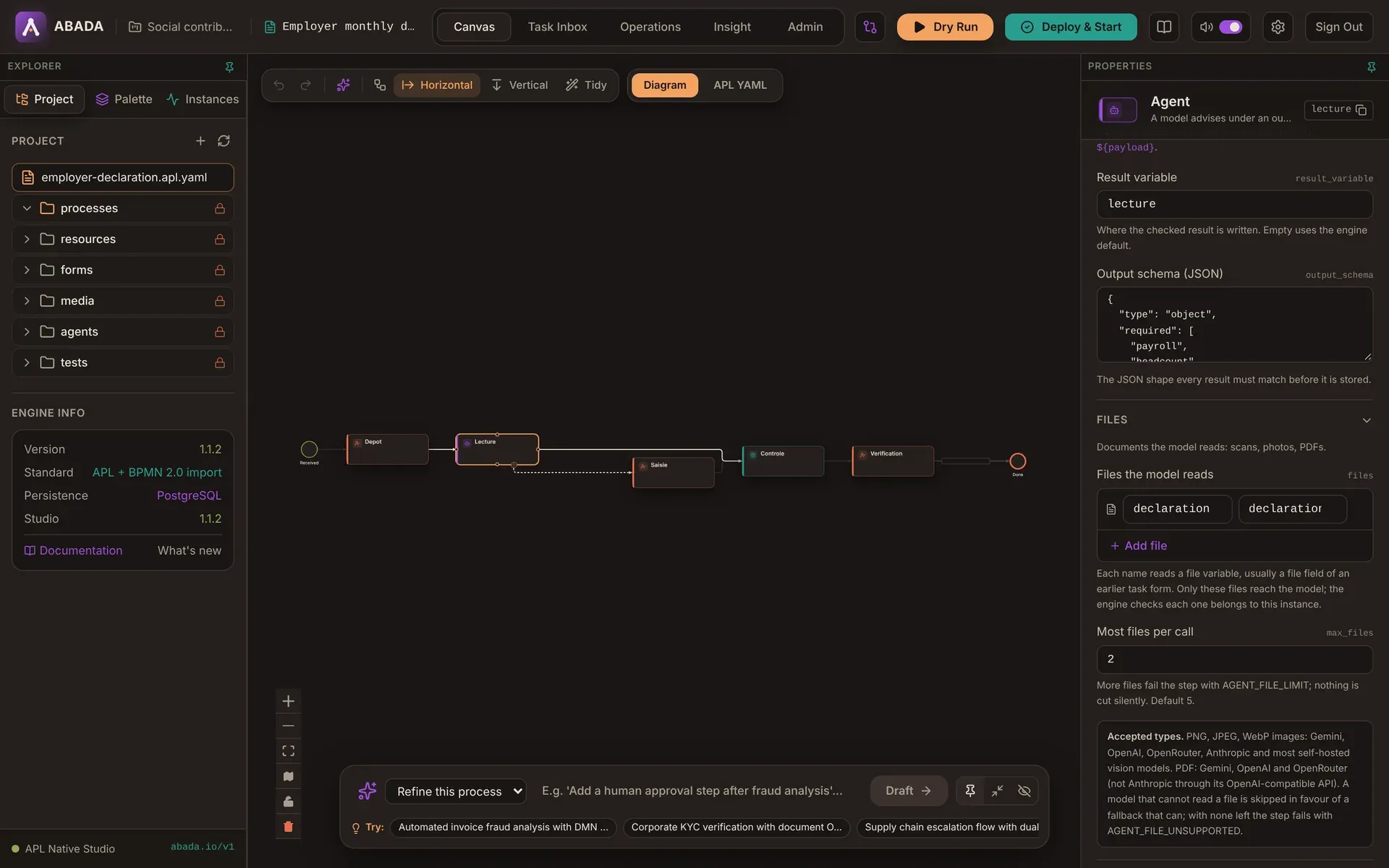
In Studio, the agent’s properties have a Files section: pick the file field of an earlier form, set the most files per call, and see which types each provider reads.
Edit routes in Studio
Section titled “Edit routes in Studio”Everything above can be built on the canvas; the APL stays the source of truth.
-
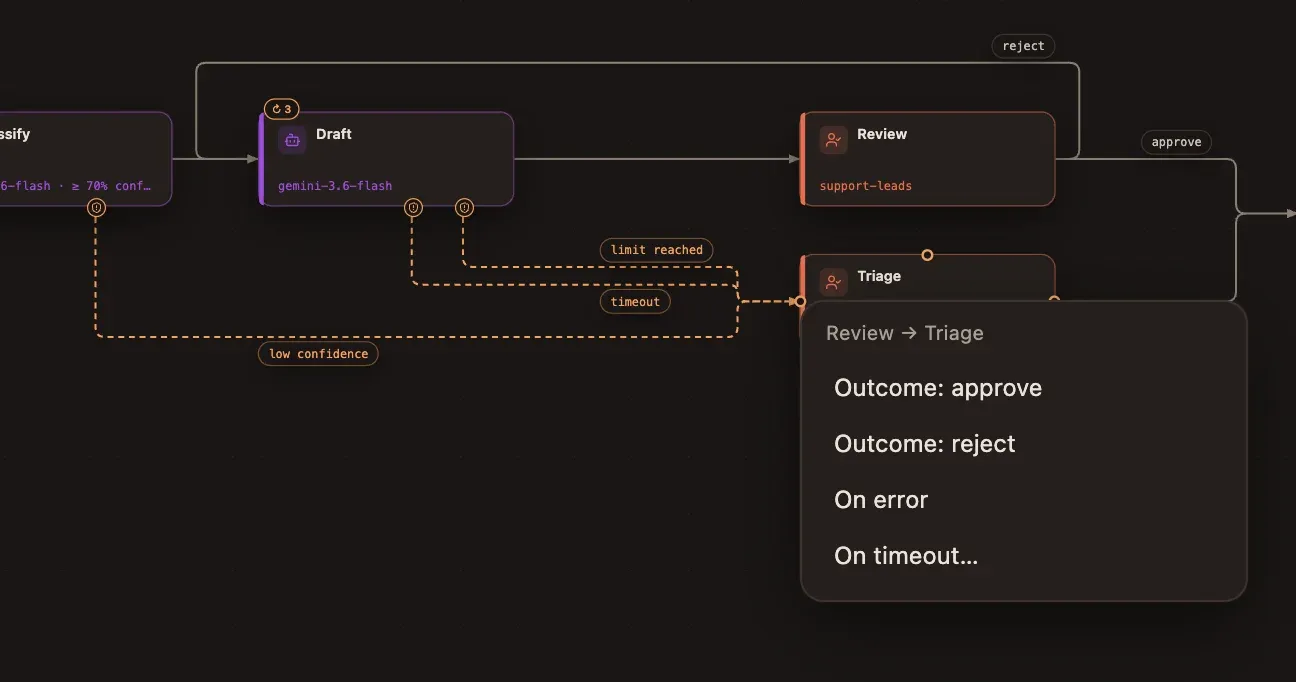
Draw a connection from a task: a menu asks what it means and offers only the routes that step supports — Next step, On error (optionally for one code), On timeout… (with its duration), Low confidence and Invalid output for agents, each review Outcome, and Loop limit reached on a loop step. A new Next step replaces the old one.
-
Delete a route: click the edge and press Delete. The route it stands for is removed from the APL. Deleting a step removes every route that pointed at it.
-
The inspector edits the same routes: error routes by code, the timeout, fallback models, escalation groups, outcomes (name, target, comment required) and the repeat limit.
-
Badges:
↻ 3on a loop step, red↻ !on an unbounded cycle,⚠ nfor engine validation issues about the step (listed in the inspector). -
Each edit is one undo step (⌘Z / Ctrl+Z).